

Local Abilities are a specialized Ability type for running DevKit-side code from an OpenHome Ability. Unlike other Ability types, which operate only within the standard Ability runtime, Local Abilities can use the DevKit hardware, system resources, and the Python environment installed on the device. This includes Python imports that are restricted in the standard runtime, file system operations, shell commands, hardware access such as GPIO pins, sensors, LEDs, and connected peripherals, and system-level data such as CPU, memory, temperature, and network state. Use Local Abilities for IoT projects, custom hardware integrations, voice-controlled physical devices, device telemetry, long-running on-device tasks, and any use case that requires direct interaction with the DevKit or capabilities beyond the standard Ability runtime.Documentation Index
Fetch the complete documentation index at: https://docs.openhome.com/llms.txt
Use this file to discover all available pages before exploring further.
Local Abilities only run on actual OpenHome DevKit hardware. They do not run in the web Live Editor’s simulated environment.
How It Works
A Local Ability is split between the standard Ability runtime and DevKit-side execution.main.py handles the Agent flow, while devkit_functions.py runs hardware, system, and device-level code on the OpenHome DevKit.
File Structure
| File | Runtime | Use for |
|---|---|---|
main.py | Standard Ability runtime | Voice interaction, prompts, conversation state, SDK calls, and calls to DevKit-side functions. |
devkit_functions.py | OpenHome DevKit | Hardware control, connected peripherals, system operations, shell commands, system telemetry, ambient intelligence workflows, and DevKit-side Python packages. |
requirements.txt | OpenHome DevKit | Python dependencies installed for devkit_functions.py. |
requirements.txt are installed for devkit_functions.py on the OpenHome DevKit. They are not available in the standard Ability runtime where main.py runs.
Calling DevKit Functions
Usesend_devkit_capability_action() in main.py to run a registered function from devkit_functions.py.
| Parameter | Type | Description |
|---|---|---|
function_name | str | Name of the function registered in devkit_functions.py. |
args | list[str] | Arguments passed to the DevKit function. Values are passed as strings; cast them inside devkit_functions.py when another type is required. |
timeout | int | Maximum number of seconds to wait for the function to complete. |
capability_name | str (optional) | Name of another installed Ability whose devkit_functions.py should handle the call. Omit to use the current Ability. |
devkit_functions.py Execution Flow
devkit_functions.py runs on the OpenHome DevKit as a Python script. Functions that should be callable from main.py must be registered in FUNCTION_REGISTRY, and the function_name passed from main.py must match one of those registry keys.
devkit_functions.py should include a Python main guard: if __name__ == "__main__". The main guard reads the requested function name and arguments, then runs the matching registered function.
Values in args are passed to the DevKit-side function as strings. Cast them inside devkit_functions.py when the function requires a specific type, such as an integer, boolean, or JSON object.
Use print() for output that should be returned to main.py; standard output is captured in result["output"]. Python return values are not captured by send_devkit_capability_action().
Use web_logger for diagnostics. These logs appear in the DevKit section of the Ability Live Editor and are not returned to main.py.
Response Shape
send_devkit_capability_action() returns an object with the execution status, captured output, and request metadata.
output contains the standard output produced during execution. If the function does not print anything, output is None.
error contains the error message when execution fails. Otherwise, it is None.
Logs written with web_logger are separate from the returned object. They appear in the DevKit section of the Ability Live Editor logs and are useful for debugging DevKit-side execution.
Example: Wi-Fi Status
This example reads the DevKit’s current Wi-Fi connection and speaks it back to the user.devkit_functions.py — runs on the DevKit:
main.py — runs in the standard Ability runtime:
Calling Functions from Another Local Ability
main.py can also call functions from another installed Local Ability’s devkit_functions.py. This is useful when one Local Ability exposes reusable DevKit-side functions that another Ability needs to use.
capability_name is only needed for cross-Ability calls. When it is omitted, the call uses the current Ability’s devkit_functions.py.
capability_name, see Installed Abilities later in this document.
Local Abilities in the Live Editor
Select the Local Category
To create a Local Ability, select Local from the Ability categories and choose a template. If you upload a custom Ability, the project must includedevkit_functions.py and requirements.txt.
Advanced DevKit Controls
If your DevKit is online and connected, the Advanced DevKit Controls toggle appears in the Ability Editor. Enable it to expand the Advanced DevKit Controls section. Once Advanced DevKit Controls are enabled, scroll down and you will see the Advanced DevKit Controls section. From here you can sync your Ability to the DevKit, restart the Agent, and view the DevKit connection status.

Sync Local Abilities with the DevKit
When the DevKit is online and connected, changes saved in the Live Editor are synced to the DevKit automatically. On save:devkit_functions.pyorrequirements.txtchanges are pushed to the DevKit without restarting the Agent. Ifrequirements.txtchanged, new dependencies are installed on the DevKit.main.pychanges are saved to the OpenHome platform, synced with the DevKit sandbox, and the Agent restarts on the DevKit so the latest Ability code is used.
main.py, save after completing the intended change. Each save can restart the Agent on the DevKit while the DevKit is connected.
If the DevKit was offline while you updated a Local Ability:
main.pychanges sync when the DevKit reconnects.devkit_functions.pyorrequirements.txtchanges should be synced before testing. After the DevKit reconnects, click Sync Abilities from Advanced DevKit Controls to apply the latest changes.
 .
.
Logging on the DevKit
Use the DevKit logger insidedevkit_functions.py to debug on-device behavior. Messages written with this logger appear in the DevKit section of the Ability Editor logs.

Installed Abilities
To use functions from another Ability’sdevkit_functions.py, you need that Ability’s name to pass in the capability_name parameter. To find it, click the Quick Reference Installed Abilities button in the top-left corner of the Ability Editor.
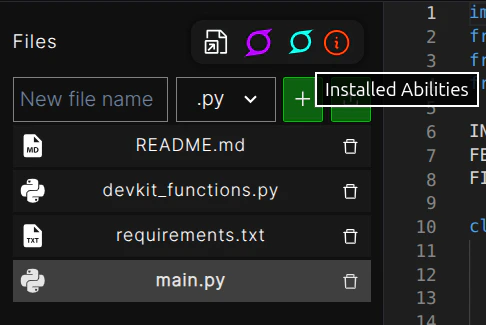
devkit_functions.py file and pass it in the capability_name parameter.
Example: DevKit Stats
This is a voice-controlled DevKit telemetry reporter. Users say something like “check cpu” or “how hot is the devkit” and the DevKit reads its system stats and speaks them back.Trigger words
This example can be triggered with phrases like:devkit infosystem infohow long has my devkit been running
requirements.txt
No third-party packages are required for this example — all stat checks use Python’s standard library and standard Linux interfaces (/proc, /sys, and shell commands like iwgetid, df).
For other Local Abilities that need hardware libraries, list them here. Some common examples:
devkit_functions.py need to go here — they get installed on the DevKit side when you sync.
main.py — standard Ability runtime
devkit_functions.py — DevKit-side telemetry
Interaction Flow
Route
main.py keeps the voice flow in the standard Ability runtime and uses the LLM as a strict router from natural language to a registered DevKit telemetry function.Execute
main.py calls send_devkit_capability_action() with the selected function name, arguments, and timeout. The matching function runs on the OpenHome DevKit from devkit_functions.py.Return output
devkit_functions.py reads the requested device data, logs diagnostics with web_logger, and prints a structured JSON payload. The printed payload is captured in result["output"].Respond
main.py parses result["output"], reads spoken_response, and speaks the result. The structured data field remains available for richer logic.Best practices
Put voice logic in main.py, hardware logic in devkit_functions.py
Put voice logic in main.py, hardware logic in devkit_functions.py
Clean separation makes both sides easier to debug. Keep
devkit_functions.py focused on the hardware work.Set sensible timeouts
Set sensible timeouts
Hardware calls can block. A 5–10 second timeout is typical for lightweight actions; bump to 30 or more for long-running effects or captures.
Use DevKit logs to debug on-device code
Use DevKit logs to debug on-device code
Use the DevKit logger
web_logger for debugging and inspect messages in the DevKit logs section inside the Ability Editor.requirements.txt is for the DevKit side only
requirements.txt is for the DevKit side only
Packages listed there are installed for
devkit_functions.py. They are not available in the sandboxed runtime where main.py runs.Handle missing hardware gracefully
Handle missing hardware gracefully
Not every DevKit has every peripheral. Wrap hardware initialization in
try/except and log an informative error instead of crashing — your Ability can still speak a helpful message to the user.See also
- Ability Types — when Local is the right choice vs. Skill, Brain, or Background Daemon
- Background Abilities — for always-on monitoring that doesn’t need hardware access
- SDK Reference — full method catalog
- Voice-First Best Practices — the UX rules that apply to any Ability, including Local